
An ecommerce product photo must show the item accurately and clarify the buying context. A clean white listing image, lifestyle scene, and campaign crop may all start from one source. The tool that makes the first attractive render is not always the tool that gets the full set approved.
Banana AI, Photoroom, and Adobe Firefly take different routes. Banana AI provides a browser workspace for reference-driven editing and multiple image models. Photoroom focuses on product-photo production, staging, and catalog throughput. Firefly combines prompt editing with Adobe tools and partner models.
- Banana AI: model choice and reference-based iteration in one workspace.
- Photoroom: product staging, repeatable catalog variants, and batch work.
- Adobe Firefly: prompt edits, Generative Fill, and Adobe-centered handoff.
This comparison uses current product pages, API documentation, and Banana AI's model catalog. It compares workflow fit and documented controls, not identical-prompt benchmark scores.
Banana AI vs Photoroom vs Adobe Firefly at a glance
| Option | Best fit | Editing control | Output and scale | Revision cost signal |
|---|---|---|---|---|
| Banana AI | Reference-driven product scenes and model exploration | Text prompts, reference images, model-specific aspect ratio, resolution, and format controls | Browser workspace with Nano Banana family models and GPT Image 2 | Low context switching for exploratory edits; inspect product identity after each pass |
| Photoroom | Catalog production, product staging, and marketplace variants | Text edits, product-scene prompts, up to four extra reference images in Edit With AI, and a fixed seed | 1K Edit With AI output by default; 2K and 4K are Enterprise options; product workflows include batch automation | Strong when the same product brief repeats across many assets |
| Adobe Firefly | Creative editing inside a broader Adobe workflow | Prompt to Edit, Generative Fill, Remove, Expand, Upscale, image-to-image, and partner model selection | Plan and model dependent; standard image features and credit-based premium or partner features follow different rules | Easy to explore directions; review model choice, credits, and handoff requirements |
The table separates product capability from production fit. A tool can support a feature and still add work if the team must rebuild the same asset across sizes, channels, or approval rounds.
What matters in an ecommerce product-photo comparison
Compare five checks in the approval loop:
- Product identity: Does the package, label, silhouette, material, and color stay recognizable?
- Scene control: Can you place the item in a white catalog setup, a lifestyle scene, or a campaign composition?
- Output contract: Can the workflow produce the ratio, resolution, and file type required by the channel?
- Revision cost: Can you correct one local problem without rebuilding the whole image?
- Availability: Is the capability available in the browser, through an API, on a plan, or only with a higher tier?
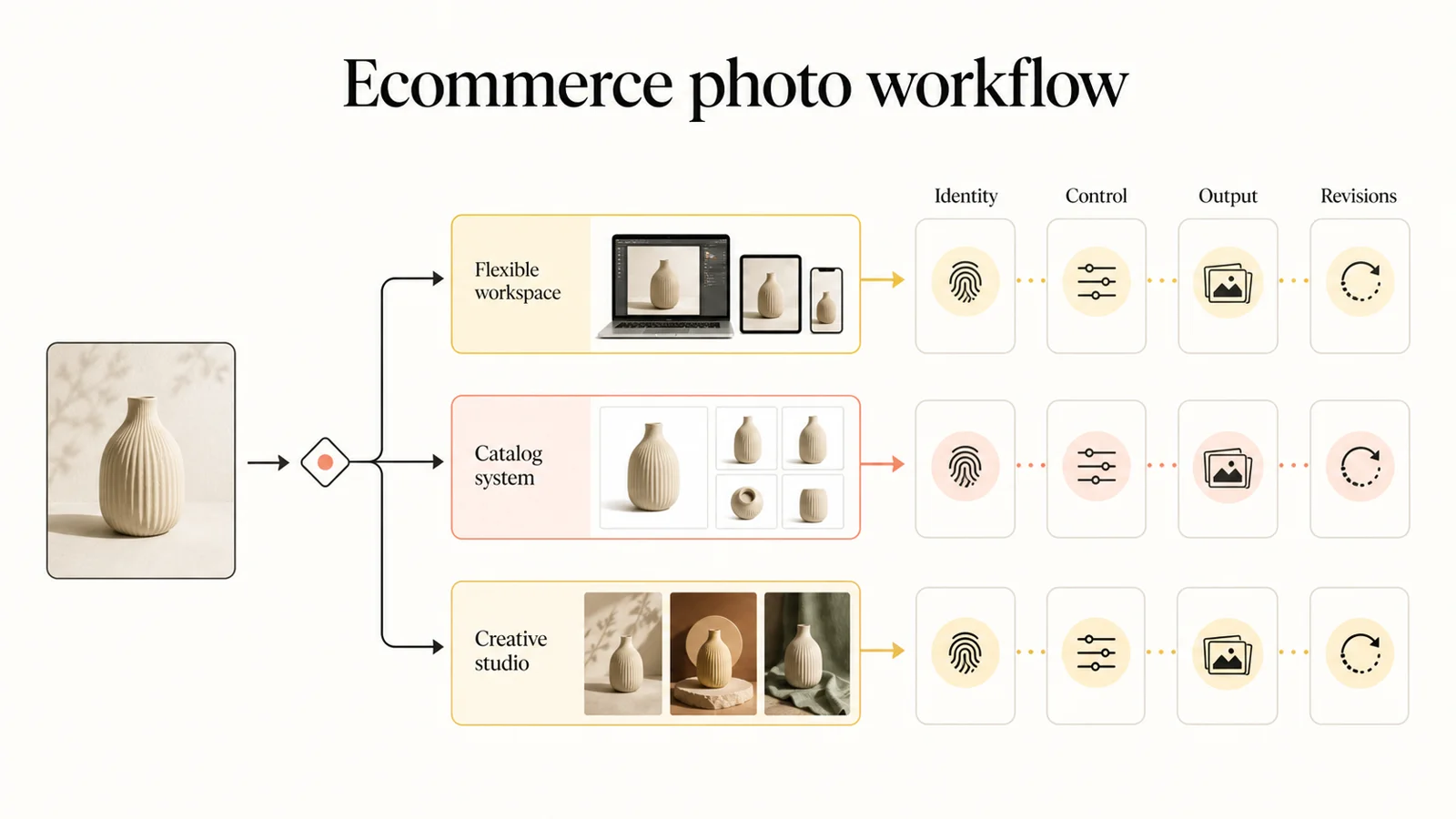
For a fair test, use a source photo with a visible label, reflective surface, clear edge, and natural shadow. Request a marketplace image, lifestyle scene, and local color or prop change. Compare the second pass.
Banana AI: flexible model access for product edits
Banana AI is the flexible option here. Its current image page supports text prompts and reference images in text-to-image and image-to-image modes. The model catalog includes Nano Banana, Nano Banana Edit, Nano Banana 2, Nano Banana Pro, and GPT Image 2. Model specifications expose aspect ratio, resolution, and format controls, although fields vary by model.
This suits a team that wants to try multiple models without moving the source image between tools. A reference photo can anchor the product while the prompt changes the setting, crop, lighting, or supporting objects. Nano Banana Pro and GPT Image 2 expose 1K, 2K, and 4K choices in the current source contract, useful when one concept needs several delivery sizes.
Banana AI offers a broad creation surface, but operators still need to check labels, edges, reflections, shadows, and channel crops. It fits teams that value iteration and model choice more than catalog operations.
Start with the Banana AI image generator when the job begins with a reference image and the creative direction may change during review. The Banana AI pricing page is the right place to check the current credit plans before estimating a recurring catalog workload.
Photoroom: catalog throughput and product staging
Photoroom starts from ecommerce production. Its product-photography pages cover AI backgrounds, product staging, virtual models, and automation for growing catalogs. The workflow emphasizes consistent visuals across marketplaces and stores.
The Edit With AI API adds controls for a production queue. A text prompt can add or remove objects, change a color, create a lifestyle scene, or request another camera angle. The documentation supports up to four additional reference images, for five total with the main input. A fixed positive integer seed can reduce randomness for repeated calls with the same image and prompt.
Output limits matter. Edit With AI defaults to 1K; 2K and 4K output are listed for Enterprise plans. A team planning high-resolution campaign assets should confirm that boundary before building its approval process.
Photoroom is the clearest fit for consistent white-background, lifestyle, angle, and channel variants. It is less useful for broad art direction or multi-model exploration.
Adobe Firefly: creative editing with Adobe and partner models
Firefly covers a wider creative surface. Adobe's AI photo editor accepts JPEG, PNG, and WebP uploads up to 100MB and supports prompt edits, object removal, Generative Fill, Expand, Upscale, image-to-image, Scene-to-Image, and Generative Match.
For product campaigns, a team can start with a packshot, replace the environment, expand the frame for a banner, match a reference mood, and continue in an Adobe-centered workflow. Firefly also presents Adobe and partner model choices, so record the selected model with the output.
Firefly's cost model needs closer inspection than a per-image estimate. At the time of writing, Adobe's plan page lists free daily generations and paid plans beginning at $9.99 per month, with monthly generative-credit allocations. Paid plans include unlimited standard image features; premium and partner outputs use credits. Prices and allowances can change by region and billing term.
Adobe describes its own Firefly Text to Image model as trained on licensed images and public-domain content. Treat that as model-specific. If a campaign has a commercial-use or provenance policy, confirm which model produced the image and which terms apply.
Firefly suits creative teams that need more than a product-staging queue, although its range adds decisions about models, credits, and handoff.
Choose by ecommerce product-photo task
| Ecommerce task | Start with | Why it fits | Review before approval |
|---|---|---|---|
| Clean marketplace image from a source photo | Photoroom | Product-photo editing, backgrounds, and catalog consistency stay in one workflow | Cutout edges, shadows, crop rules, and brand templates |
| Lifestyle scene with the product as the anchor | Photoroom or Banana AI | Photoroom gives a product-staging path; Banana AI gives more room for model and prompt exploration | Product shape, label placement, perspective, and scene plausibility |
| Several reference images in one composition | Banana AI or Photoroom | Both current workflows accept reference images, with different limits and interfaces | Which reference controls identity, lighting, and composition |
| Local color, prop, or background revision | Firefly, Photoroom, or Banana AI | Each supports prompt-led changes, but the selection and revision surfaces differ | Whether the edit changed unrelated parts of the product |
| Campaign direction and mood exploration | Adobe Firefly | Image editing, image-to-image, Scene-to-Image, and partner models support broader exploration | Model choice, credits, rights, and final production cleanup |
| Repeated catalog variants | Photoroom | Product staging and automation map to a catalog queue | Batch limits, resolution tier, and approval time per SKU |
The strongest choice changes with the job. A single tool does not need to own the whole pipeline if the handoff cost stays lower than forcing a specialist tool to cover an unrelated task.
Revision cost decides the winner for your team
The first render gets attention; the second and third passes determine time saved. A product image can fail because a logo shifted, a handle changed shape, a shadow points the wrong way, or the crop leaves no room for marketplace text. Those failures create cleanup even when the image looks polished.
Run a small approval test before committing to a workflow:
- Use one product reference across all three options.
- Request the same neutral catalog scene, lifestyle scene, and local revision.
- Record the selected model, plan, output size, format, seed or other repeatability control, and number of generations.
- Inspect the image at the actual marketplace or store display size.
- Ask for one correction without changing the rest of the brief.
- Measure approved assets, rejected assets, manual cleanup minutes, and total credits or subscription cost.
This test separates a strong demo from a dependable production path. It also shows whether model flexibility, catalog automation, or creative range matters most.
Which option should you use?
- Solo sellers and small creative teams: Use Banana AI for reference edits and model choice, or Photoroom for clean catalog staging.
- Catalog and marketplace operations: Start with Photoroom. Its product focus, staging controls, batch workflow, and API suit repeated SKU work.
- Adobe-centered creative teams: Use Firefly when prompt edits, Generative Fill, image expansion, and Adobe handoff are already standard.
- Mixed needs: Split source editing and production queuing only when the transfer preserves the product reference without adding a review round.
For model-level tradeoffs, see the Nano Banana Pro, GPT Image 2, and FLUX.2 comparison. It focuses on model behavior and image-editing controls; this article focuses on the product-photo workflow.
FAQ
Is Banana AI better than Photoroom for ecommerce product photos?
Neither wins for every ecommerce team. Banana AI is a strong starting point for reference edits and model exploration; Photoroom is the direct fit for catalog staging, repeated variants, and throughput.
Which option gives the most control over revisions?
It depends on the revision. Banana AI gives model-specific reference and output controls. Photoroom gives prompt, reference, and seed controls in Edit With AI. Firefly gives prompt edits, Generative Fill, Expand, Remove, and other focused operations. Test the correction your team makes most often.