
AI product photography helps an ecommerce team turn one source image into a listing shot, a lifestyle scene, a marketplace crop, and an ad concept. The hard part is keeping the product recognizable across those versions. A new background helps when the label, silhouette, material, and proportions still match the item customers will receive.
This shortlist covers six tools with different operating shapes:
- Banana AI for reference-driven edits and model choice in one browser workspace.
- Photoroom for catalog production, product staging, templates, and batch work.
- Claid for product scenes, brand rules, high-resolution output, and API scale.
- Pebblely for fast background-led creative from a small product catalog.
- Flair.ai for on-model imagery, packaged goods, and bulk campaign content.
- Pixelcut for seller-friendly product variations, batch edits, and API access.
The right pick depends on the job, the approval rules, and the number of images you need each month. Use the tables as a starting point, then run one product through the same listing, lifestyle, and revision test before you commit.
Best AI product photography tools at a glance
| Tool | Best fit | Controls | Scale and output signal | Main tradeoff |
|---|---|---|---|---|
| Banana AI | Reference edits and model exploration | Prompts, references, ratios, resolutions | Browser access to Nano Banana family models and GPT Image 2 | No catalog queue |
| Photoroom | Ecommerce catalogs and variants | Backgrounds, staging, templates, batch, API | AI credits and export quotas | Separate budgets for advanced generation |
| Claid | Branded scenes and API production | Photoshoot modes, smart frame, APIs | Native 4K, separate web/API credits | Plan rate limits before batching |
| Pebblely | Small catalogs and lifestyle backgrounds | 100+ templates, references, bulk, resize | Basic 200 / Pro 500 monthly images | Less local control |
| Flair.ai | On-model imagery and packaged goods | Model/pose, bulk, regeneration, API | Image, video, text, and ad generation | Confirm plan and model limits |
| Pixelcut | Seller variations and quick edits | Backgrounds, fill, upscaling, batch, API | Free/paid plans, HD exports, credits | Review repeatability |
Treat the table as a fit map, not a universal ranking. A strong campaign image still fails a marketplace workflow when the tool changes a small label or cannot repeat a crop.
How to evaluate an AI product photography tool
Test the full path from source photo to approved asset. Five checks expose the differences between these tools:
- Product identity: Does the package, logo area, edge, material, and color survive the scene change?
- Scene control: Can you create a white listing image, a lifestyle setting, and a campaign crop without rebuilding the brief?
- Output contract: Can you get the aspect ratio, resolution, format, and framing each sales channel requires?
- Revision cost: Can you fix one prop, color, shadow, or crop without changing the rest of the product?
- Availability: Does the needed feature live in the browser, a batch editor, an API, or a higher plan?
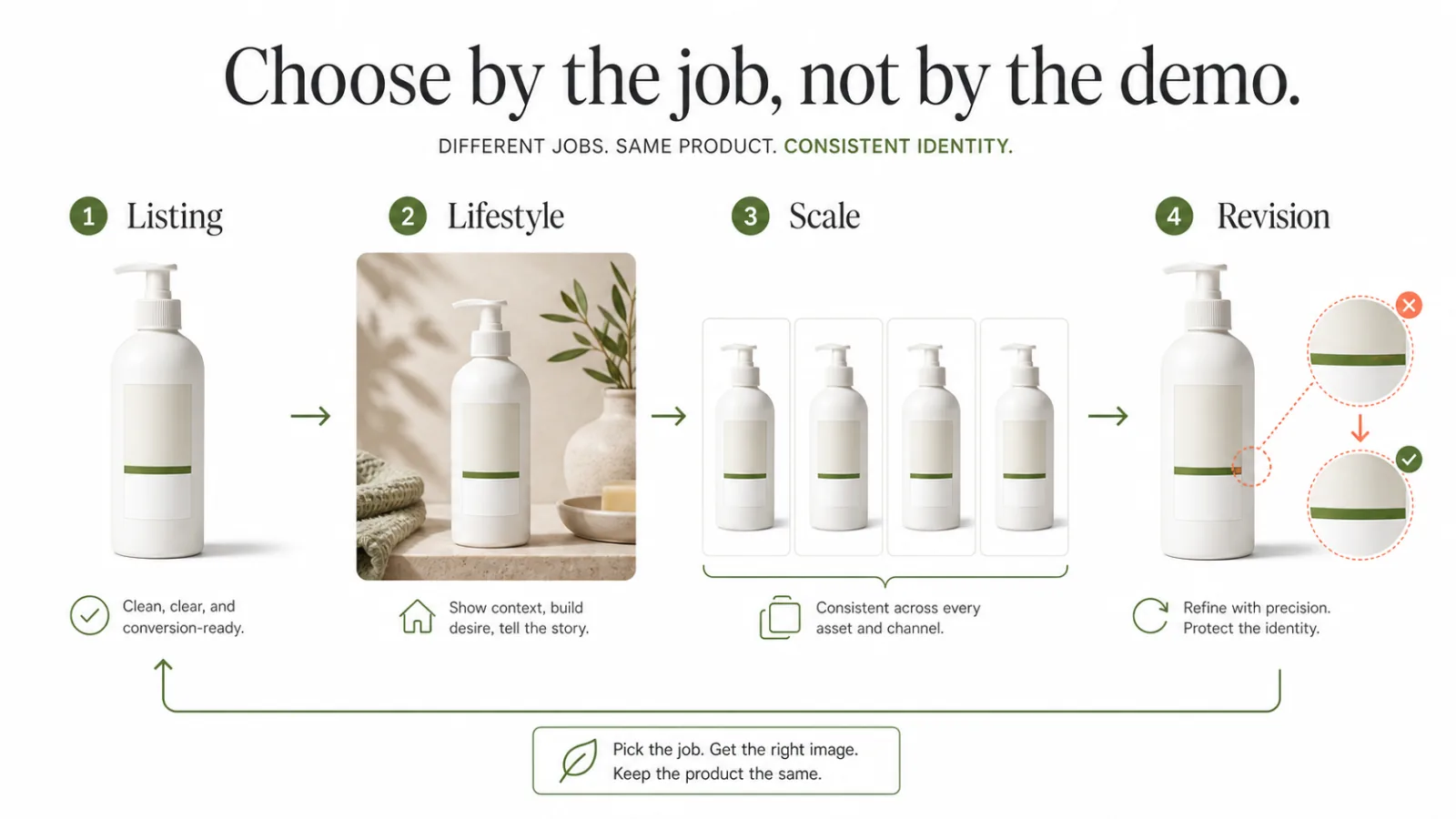
Use a source image with a visible label, a hard edge, a reflective surface, and a natural shadow. Those details reveal identity drift faster than a plain white bottle or an unmarked box.
1. Banana AI: Best for reference-driven model choice
Banana AI suits teams that start from a product reference and want model choice without moving source files. Its current surface supports prompts, references, text-to-image, and image-to-image editing. The live catalog exposes Nano Banana, Nano Banana Edit, Nano Banana 2, Nano Banana Pro, GPT Image 2, and model-specific resolution and aspect-ratio choices.
Banana AI does not present itself as a catalog operations system. Teams that need SKU queues, reusable templates, or batch governance should test the handoff first. Start with the Banana AI image generator, then check Banana AI pricing before estimating recurring credit use.
2. Photoroom: Best for ecommerce catalog production
Photoroom starts with the ecommerce problem. Its product photography surface covers background removal, lighting correction, product staging, virtual models, templates, and batch editing for listings, stores, marketplaces, and social channels.
Photoroom's current pricing separates core tools from credit-based AI tools such as AI Backgrounds Studio, Virtual Model, and Edit with AI. The plan page says export limits apply to visual assets up to 2K, while API and MCP usage use a separate allowance. Credit amounts can vary by region, so verify the live plan before committing to a monthly volume.
That makes Photoroom a strong first stop for repeated SKU work. Check credit cost, export quota, and template behavior before promising a fixed monthly volume. Its API adds background removal, standardization, generated backgrounds, and ad variations to an external queue.
3. Claid: Best for brand rules and API scale
Claid combines a product-focused web studio with APIs. AI Photoshoot starts from one product image and offers precise mode for preserving shape and angle, plus creative mode for broader scene exploration. It covers lifestyle scenes, backgrounds, shadows, upscaling, and output up to native 4K.
Claid's API catalog includes product scenes, background removal, upscaling, outpainting, shadow generation, light correction, and smart frame controls. Web and API credits stay separate. The reviewed API documentation lists default limits of 4 requests per second and 120 requests per minute, with higher limits available for some enterprise setups.
Choose Claid when brand-approved backgrounds, framing, or an API handoff matter. Review labels and reflective materials after each generation.
4. Pebblely: Best for fast small-catalog creative
Pebblely turns one product image into listing photos, social content, website imagery, email banners, and ads. Its current page offers more than 100 templates, bulk generation, reference images, and multiple output sizes.
This suits a small seller who needs lifestyle scenes without learning a full design editor. Teams with frequent label edits, complex masks, or strict layout rules should compare its second pass with a more controlled editor.
The current pricing page shows Lite at US$9, Basic at US$19, and Pro at US$39. The FAQ describes up to 200 monthly images on Basic and 500 on Pro. Treat these figures as a regional plan snapshot.
5. Flair.ai: Best for on-model and packaged-goods campaigns
Flair.ai suits brands that need more than a background swap. Its on-model flow covers model types, poses, styles, environments, and lighting. Its consumer packaged goods pages cover consistent angles, packaging concepts, lifestyle scenes, and multi-product arrangements.
Flair also exposes bulk generation for images, videos, text, and ads, plus an API. Product regeneration, magic erase, upscaling, variations, camera-angle changes, and dimension extension provide repair paths.
Choose Flair when model-based merchandising or campaign ideation drives the brief. For a marketplace catalog, confirm repeated geometry, fixed crops, and approval history before batching.
6. Pixelcut: Best for seller-friendly variations
Pixelcut's Product Showcase flow starts with a product photo, removes the background, adds a described scene, and returns variations. Its current page also covers AI-generated models, lifestyle settings, high-resolution exports, and product animation.
The broader editor adds background removal, upscaling, generative fill, shadow generation, and edits across hundreds of files. Its API covers background removal, upscaling, generated backgrounds, and try-on. Paid plans add the full AI set, batch editing, integrated workflows, and HD exports; advanced operations use credits.
Pixelcut fits a seller who needs marketplace images and social variations from one workspace. It is less specialized than Photoroom or Claid, so verify identity and repeatability across a real SKU batch.
Choose by ecommerce product-photo job
| Ecommerce job | Start with | Why it fits | Review before approval |
|---|---|---|---|
| Clean marketplace image | Photoroom or Pixelcut | Background, cleanup, product editing | Edges, shadows, crop, label |
| Lifestyle scene for a small catalog | Pebblely or Banana AI | Templates or model and prompt choice | Proportions, scale, second pass |
| Branded scenes across many SKUs | Claid or Photoroom | Repeatable web and API paths | Colors, framing, credits, batch |
| On-model or in-use imagery | Flair.ai or Claid | Model-led and lifestyle scenes | Hands, fit, geometry, review |
| Packaging concept before production | Flair.ai | CPG concepts and arrangements | Text, dieline, final packshot |
| API-driven image queue | Claid or Photoroom | Product-image APIs at scale | Rate limits, credits, retries, metadata |
Give each tool a job instead of forcing a single ranking. A mixed stack can protect product identity while another tool handles throughput or campaign variations.
How to test before you pay
Run a production-shaped test with one product before you compare monthly plans:
- Pick a source image with a visible label, clear edges, a reflective area, and a natural shadow.
- Request three outputs: a neutral listing image, a lifestyle scene, and one channel-specific crop.
- Record the tool, plan, model, output size, format, credits, and time used for each result.
- Make one local revision, such as changing a prop or background color while keeping the product fixed.
- Inspect each image at its real marketplace, store, or ad size. Zoomed gallery previews hide small label and edge errors.
- Count approved outputs, rejected outputs, manual cleanup minutes, and the cost of the next revision.
Score each candidate on product identity, scene control, output readiness, revision cost, and scale. The first image matters less than the approved images you can produce without another review round.
Which AI product photography tool should you choose?
- Choose Photoroom for a catalog team that needs product staging, templates, batch work, and ecommerce-specific operations.
- Choose Claid for brand rules, high-resolution product scenes, and an API path with explicit output operations.
- Choose Pebblely for a small catalog that needs fast lifestyle backgrounds and predictable monthly image tiers.
- Choose Flair.ai for on-model imagery, packaging concepts, and campaign content across images, videos, and text.
- Choose Pixelcut for seller-friendly variations, batch edits, and a free-to-paid path across browser and mobile work.
- Choose Banana AI when reference editing and model choice matter more than catalog automation.
For listing images and broader editing, read the ecommerce product photo comparison. It compares a flexible image workspace, a catalog system, and a creative editor.
FAQ
What is the best AI product photography tool for a small ecommerce store?
Start with Pebblely or Pixelcut for background and scene variations. Use Photoroom for templates, catalog consistency, or batch editing. Run a second revision before you choose.
Which tool is best for a large product catalog?
Photoroom and Claid offer clear catalog paths. Photoroom emphasizes templates, batch editing, and exports. Claid adds product-scene APIs, smart framing, and brand operations. Choose based on your queue and credit model.
Can AI product photography replace a product shoot?
It can reduce scenes and reshoots, but it does not remove review work. Keep an approved source photo, inspect labels and materials, and verify generated lifestyle scenes before publication.